One-tap offer check
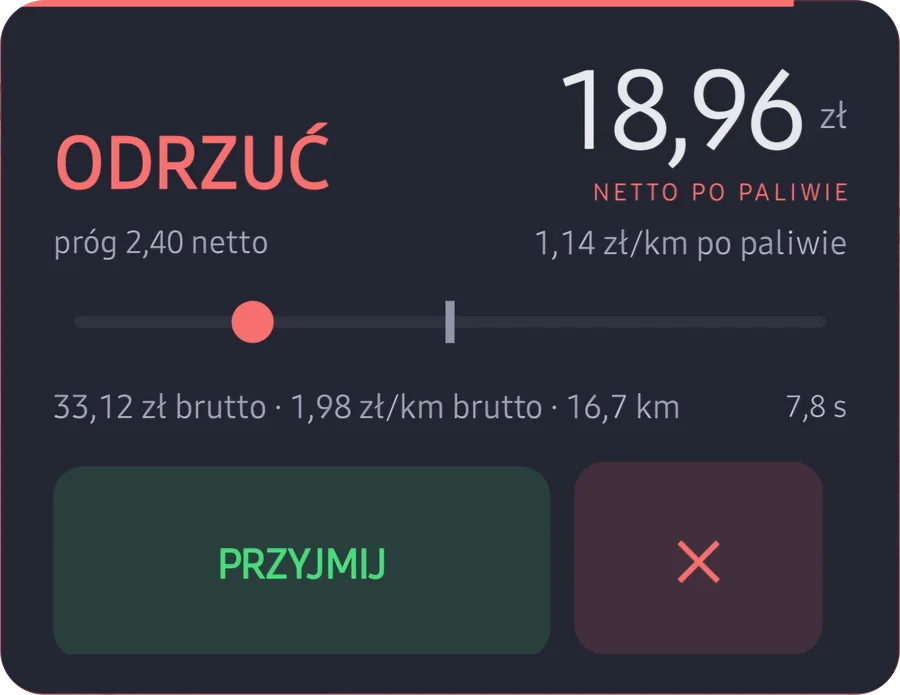
During your shift a small bubble floats over the courier app. Tap it on an offer and you see ACCEPT or REJECT before the time to decide runs out.
Free Android app
Tap the bubble over an offer from Glovo, Uber, Bolt or Wolt, and the app works out what you really keep — after tax, fuel and commission. It also tracks your earnings, hours and kilometres. Your data stays on your phone.
Android 7.0 or newer · approx. 140 MB file from outside Google Play · all versions

Features
During your shift a small bubble floats over the courier app. Tap it on an offer and you see ACCEPT or REJECT before the time to decide runs out.
The per-km rate is worked out after tax for your type of contract and — if you enter them — after estimated fuel and the app's commission. You set your own profit threshold. How we calculate it
Start and end your shift with one button. Breaks don't count as working time, and GPS measures your kilometres if you allow it.
Daily gross and net, tips, income split by app, weekly and monthly goals with a forecast of how many hours are left.
Shift time, hourly rate and tips without opening the app. Add a tip or a voice note with one tap.
No account, no login. Your phone does all the maths, and you save backups to a file in a folder of your choice.
How it works
With one button in the app. A bubble appears over the screen and time and kilometres start counting.
The app reads the amount and kilometres from the courier app's screen and shows a verdict card.
You accept or reject the order in the courier app — “Opłaca się?” never taps anything for you. Your decision goes into the offer history.
Works with
Pyszne · Uber · Glovo
The offer is read from the text on the screen.
Stuart · Bolt Food
These apps don't expose their text, so the offer is read from a screenshot of part of the screen, on the phone itself.
Wolt
Supported, but not yet tested on real shifts.
Install
With the “Download for Android” button. Chrome will warn that the file may harm your device — that's the standard message for any app from outside Google Play. Confirm the download. Wi-Fi is best.
From the notification bar or the Downloads folder.
Android asks once: open the settings, allow installs from this source, go back and tap “Install”.
If you see a warning about an unrecognised app, confirm the install anyway.
The app walks you through language and permissions. To check offers it needs two things: display over other apps (so the bubble can appear) and setting “Opłaca się?” as your assistant (so it can read the offer from the screen). Location, notifications and microphone are optional.
Once “Opłaca się?” is your assistant, holding the Home button no longer opens Google Assistant and “OK Google” stops working. You can switch back on the same settings screen.
FAQ
Nothing. The app is free and has no paid features. If you like, you can support the author — it's voluntary and you get nothing in return.
Only download it from this site or from the link on our Discord. If you already have the app, Android won't install a file signed with a different key over it — don't uninstall the app then, it's a sign of a fake. The SHA-256 fingerprint of the signing certificate is always the same:
aee052e80dcbae4aa076263bec44eb80273f6b6a470c205e192c8eb642d3387a
Releases newer than 1.3.0-36 also list the file's SHA-256 checksum on the releases page.
For now it's distributed as a file to download from this site. Only download it from here or from the link on our Discord.
There's no account and no server of ours — earnings, hours and kilometres stay in your phone's storage. The app goes online for updates: it checks for a newer version and downloads fixes. The Google library that recognises text in screenshots sends Google diagnostic data (according to Google: phone model, versions, run times and error codes). Details: privacy policy (in Polish).
No. From an offer it takes the amount, kilometres and the name of the pickup place. It never stores customers' names, addresses or phone numbers.
Small fixes arrive on their own. When a new file is needed, the app tells you with a bar on the home screen.
It's deleted along with the app — nothing is kept in the cloud. Before uninstalling or switching phones, make a backup: More → Backup.
On our Discord with the /zglos command or by email to
kontakt@oplacasie.org.
Only send screenshots with the customer's address and name
covered.
Free, no account. Questions and bug reports — on Discord.